Free Photoshop alternatives.
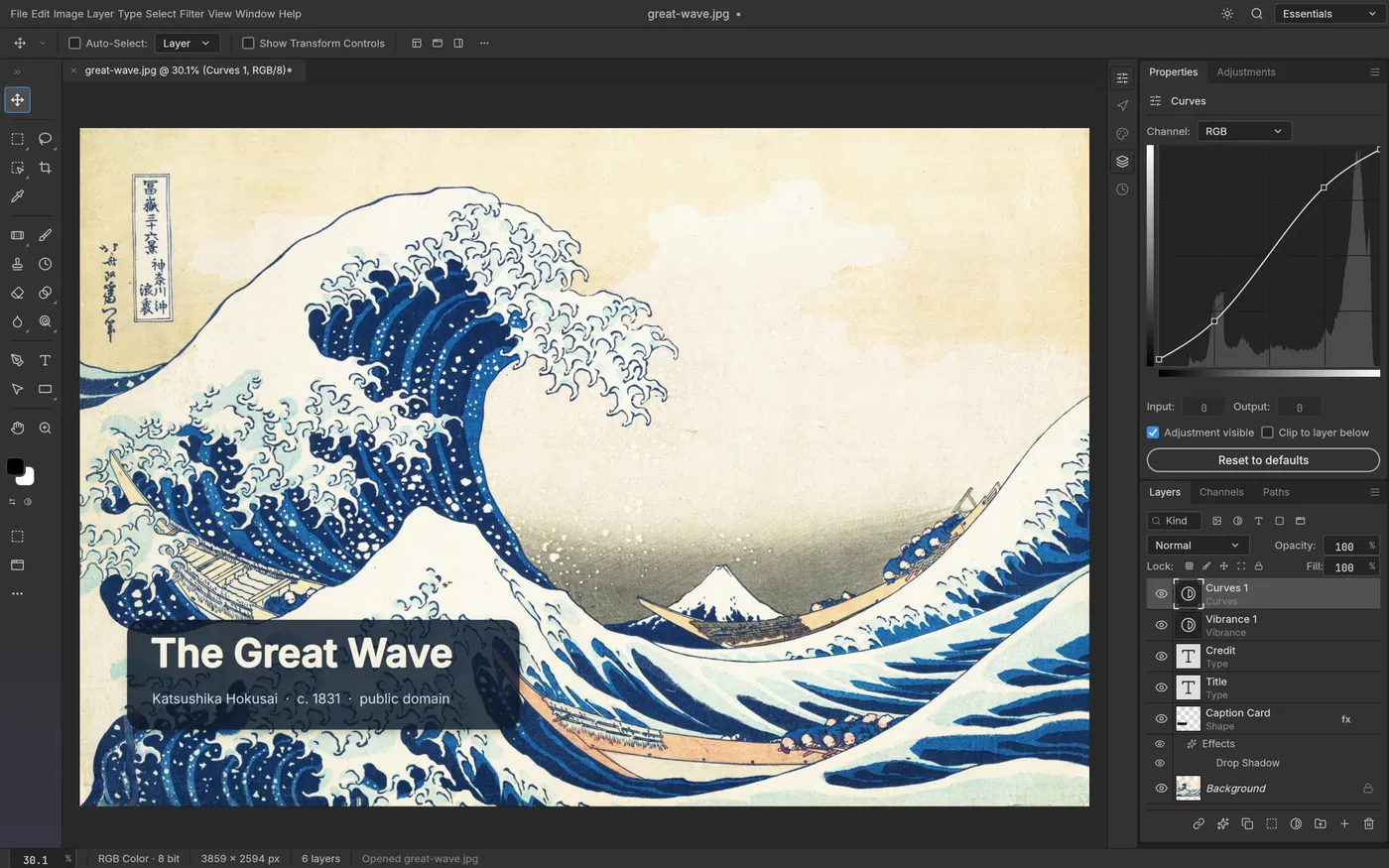
You do not need a Creative Cloud subscription to edit photos well. These free editors cover everything from quick fixes to layered PSD work, and one of them, PhotoCraft, is a brand-new open-source rebuild of Photoshop itself.
- 6 editors compared
- PSD support checked
- Updated October 2026
Quick comparison
| Editor | Price and license | Platforms | PSD files | Best for |
|---|---|---|---|---|
| PhotoCraft | Free, open source (MIT or Apache-2.0) | Windows, macOS, Linux, FreeBSD, web | Opens and saves layered PSD | Photoshop users who want the same menus and shortcuts |
| GIMP | Free, open source (GPL) | Windows, macOS, Linux | Opens PSD, some effects lost | Stable, all-round photo editing with plug-ins |
| Krita | Free, open source (GPL) | Windows, macOS, Linux, Android tablets | Opens PSD, basic layers | Digital painting and illustration |
| Photopea | Free with ads, optional paid plan | Any web browser | Opens and saves layered PSD | Quick Photoshop-style edits with nothing to install |
| Affinity (by Canva) | Free app; some AI features need Canva Pro | Windows, macOS | Imports PSD | Professional photo, vector and layout work in one app |
| Paint.NET | Free (paid Store version optional) | Windows | With a free plug-in | Fast, simple edits on Windows |
The editors in detail
- #1
PhotoCraft
Best for: Photoshop users who want the same menus and shortcuts.
Watch out: Early alpha: impressive but expect bugs.
Free, open source (MIT or Apache-2.0). Windows, macOS, Linux, FreeBSD, web.
- #2
GIMP
Best for: Stable, all-round photo editing with plug-ins.
Watch out: Different layout from Photoshop; takes time to learn.
Free, open source (GPL). Windows, macOS, Linux.
- #3
Krita
Best for: Digital painting and illustration.
Watch out: Less suited to photo retouching.
Free, open source (GPL). Windows, macOS, Linux, Android tablets.
- #4
Photopea
Best for: Quick Photoshop-style edits with nothing to install.
Watch out: Needs a browser tab; very large files can be slow.
Free with ads, optional paid plan. Any web browser.
- #5
Affinity (by Canva)
Best for: Professional photo, vector and layout work in one app.
Watch out: Requires a Canva account.
Free app; some AI features need Canva Pro. Windows, macOS.
- #6
Paint.NET
Best for: Fast, simple edits on Windows.
Watch out: Fewer advanced tools.
Free (paid Store version optional). Windows.
Why PhotoCraft is getting attention
PhotoCraft went public at the end of September 2026 from the ArtCraft team and collected tens of thousands of GitHub stars within weeks. It copies Photoshop's menus, panels and shortcuts, renders on the GPU, and reads and writes real PSD files with adjustment layers and layer styles intact. It is free, offline and open source. See PhotoCraft download for official links and install steps, and ArtCraft download for its sister apps for Lightroom, Illustrator and Premiere.
Need a quick fix instead of a full editor?
For one-off jobs you can skip installing anything:
- Remove the Gemini watermark from Nano Banana images.
- Compress a photo or shrink it to 20 KB.
- Make pixel art or an ICO icon.
Good to know.
What is the best free Photoshop alternative?
For the closest Photoshop feel and PSD support on the desktop, try PhotoCraft or Affinity. For a mature, stable editor, GIMP. For painting, Krita. For quick edits in a browser without installing anything, Photopea.
Which free editor opens PSD files?
PhotoCraft and Photopea both open layered PSD files and keep most layers editable. GIMP and Krita can open PSDs too, but some layer styles and adjustment layers are flattened or lost.
Is there a free open-source Photoshop clone?
PhotoCraft is an open-source, clean-room reimplementation of Photoshop written in Rust, made public in September 2026 and still early alpha. GIMP is the long-established open-source option with a different interface.
More free tools.
Picture to Pixel Art
Turn a picture or photo into pixel art, with a true-size sprite export.
Free · 6 retro palettes
Pixelate Photo
Apply a mosaic to a whole image or a selected rectangle.
Free · Whole photo or area
ICO Converter
Convert an image into a multi-size .ico file, from 16 to 256 px.
Free · PNG · JPG · SVG
Resize Image to 20KB
Get a photo under a file-size limit for an online form.
Free · 10 to 200 KB presets